


Every time an app talks to another service online, something checks whether that request is allowed to happen. Most of the time, that something is a small credential called an API key. It works quietly in the background, but without it, most modern apps and websites simply would not function.
In this guide, you will learn exactly what this credential is, how it works, and why almost every developer relies on one. You will also see real examples, learn how to obtain one for popular platforms like OpenAI, Google, and Gemini, and understand how to keep it safe from misuse.
What Is an API Key?
An API key is a unique string of characters used to identify and authenticate an application or user trying to access an API. Think of it as a digital pass that tells a server who is knocking on its door.
Without this credential, a server would have no reliable way to know if a request is coming from a trusted source or a random stranger. This is why almost every public API today requires one before it grants access.
This identifier does not usually represent a specific human being. Instead, it identifies the project, app, or account that owns it. This distinction matters a lot when we talk about security later in this guide.
How Do API Keys Work?
When a developer signs up for an API, the provider generates a unique credential and hands it over. This string is then attached to every request the developer’s app sends to that service.
The server checks this credential against its own records. If it matches an active, valid account, the server processes the request and returns the requested data.
An API key can be sent in different ways depending on the service. Common methods include placing it in the request header, adding it to the query string of the URL, or storing it inside a cookie.
If the credential is missing, expired, or incorrect, the server usually returns an error instead of any data. This simple check and response system is what makes an API key so effective for controlling access.
Why Are API Keys Important?
An API key is not just a formality. It plays several practical roles that keep services running smoothly and securely.
Here are the main reasons this credential matters for both developers and providers.
- It blocks anonymous or unidentified traffic from reaching sensitive endpoints
- It allows providers to enforce rate limits so no single user overloads the system
- It helps track usage patterns, which is useful for debugging and analytics
- It supports billing and monetization by linking usage to a specific account
- It allows providers to quickly revoke access if abuse is detected
Without this credential, none of this would be possible at scale, since the provider would have no way to separate one caller from another.
Types of API Keys: Public vs Private Keys
Not all keys serve the same purpose. Most APIs split their credentials into two broad categories, public and private, each with different rules.
A public API key is meant to be visible and is often embedded directly into front end code such as a webpage. A private one, on the other hand, must always stay hidden on the server side.
| Feature | Public API Key | Private API Key |
| Visibility | Can be exposed publicly | Must remain hidden |
| Common use | Maps, browser widgets | Payments, admin actions |
| Risk if leaked | Usually low | Usually high |
| Where it is stored | Client side code | Server side environment |
| Access level | Limited, read only | Broad, can modify data |
Some platforms combine both types together. In this setup, the private credential signs the request, and the public one helps verify that signature on the server.
API Key vs API Token vs OAuth: What Is the Difference?

People often use the terms key, token, and OAuth interchangeably, but they are not the same thing. Each one offers a different level of security and control.
An API key is usually static and does not expire unless manually revoked. A token is often temporary and tied to a specific session or scope. OAuth is a full authorization framework that issues tokens after a proper login flow.
| Aspect | API Key | API Token | OAuth |
| Identifies | Project or app | User session | Individual user |
| Expiration | Rarely expires | Often expires | Usually expires |
| Setup complexity | Simple | Moderate | Complex |
| Security level | Basic | Better | Strongest |
| Best for | Simple public APIs | Scoped access | User level permissions |
If your application only needs to identify which project is calling the service, this credential is often enough. If you need to know exactly which human user is making the request, OAuth is the safer choice.
Security Risks Associated with API Keys
An API key is convenient, but it also creates real security risks if it is not handled carefully. Since anyone holding a valid credential can use it, leaks can be costly.
Here are the most common risks tied to an exposed credential.
- Accidental exposure in public code repositories or screenshots
- Brute force attempts against weak or short strings
- Theft through client side vulnerabilities like cross site scripting
- Continued use of an old credential that was never revoked
- Unauthorized billing charges from a stolen credential
Because this type of credential rarely expires on its own, a single leak can remain exploitable for weeks or months if nobody notices in time.
Learn more……..Agentic AI vs Generative AI: Key Differences Explained
Best Practices to Secure Your API Keys
Protecting your API key does not require advanced tools, just consistent habits. Most security failures happen because of small, avoidable mistakes.
Follow these practices to keep every credential you manage safe.
- Never hardcode a credential directly inside your source code
- Store each key in environment variables or a secrets manager
- Apply the minimum permissions needed for every key you create
- Always send requests over HTTPS to protect it in transit
- Monitor usage logs regularly to catch unusual activity early
Following these steps will not make your credential unbreakable, but it drastically reduces the chances of it ever being misused.
How to Restrict and Rotate API Keys
Most providers allow you to restrict how a credential can be used, which adds another layer of protection beyond the key itself. Restrictions limit where and how it works.
Common Restriction Types
You can usually restrict an API key using one or more of the following methods.
- Website restrictions, allowing only specific domains to use the credential
- IP address restrictions, allowing only certain servers to call the API
- App restrictions, limiting the key to specific Android or iOS apps
Why Rotation Matters
Rotating a credential means replacing an old key with a new one on a regular schedule. This limits how long a leaked key stays useful to an attacker.
Security experts generally recommend rotating this type of credential every 90 to 180 days, and immediately if you suspect any compromise. Deleting unused keys is just as important as rotating active ones.
What Does an API Key Example Look Like?
An API key usually looks like a long, random string of letters, numbers, and sometimes special characters. There is no fixed universal format, since each provider designs its own structure.
Below are simplified examples showing the general style of this credential. These are placeholders only and not real working keys.
- A general key might look like this: sk_live_49fKdP2xLmQ7vTz1
- A cloud style key might look like this: AIzaExampleKey8821Txyz93
- A messaging platform key might look like this: pk_test_82XyZQwerty0912
Even though the format changes across providers, the purpose stays the same. Each credential acts as a unique fingerprint tied to one account or project.
How to Get an OpenAI API Key
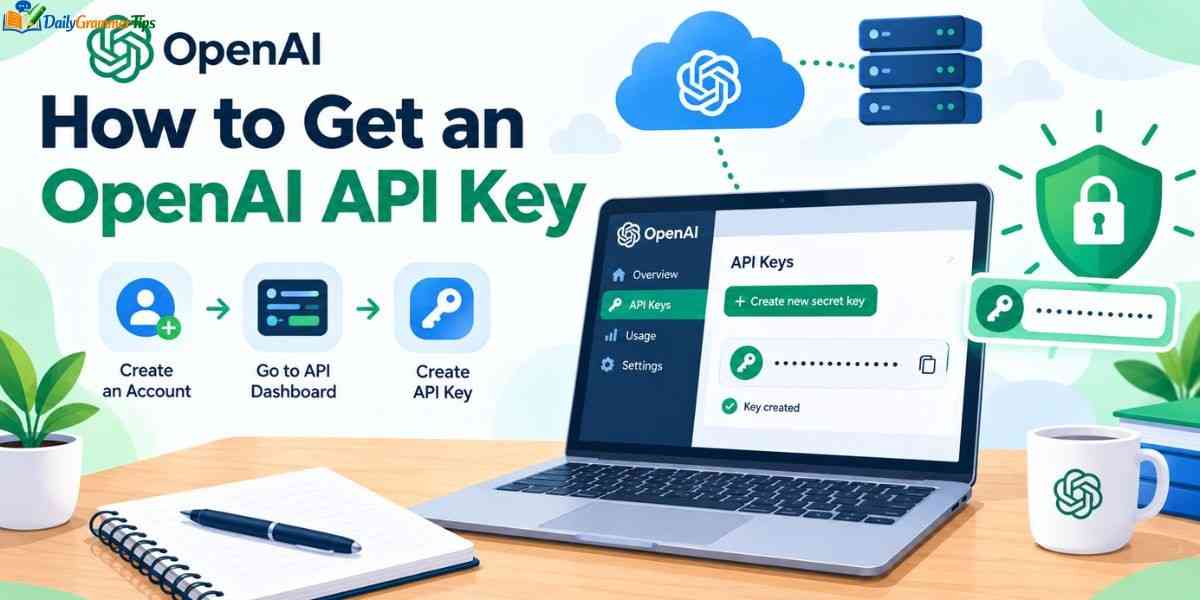
Getting this credential from OpenAI is a short process that takes only a few minutes once your account is ready.
Step 1: Create an OpenAI Account
Sign up on the OpenAI platform using your email address or an existing account from another service.
Step 2: Open the Keys Section
Once logged in, navigate to the dashboard area where these credentials are managed and generated.
Step 3: Generate and Copy Your Key
Click the option to create a new secret key. Copy it immediately, since most platforms only show the full string once.
Step 4: Store It Safely
Save your API key in an environment variable rather than pasting it directly into your project files.
How to Get a Google API Key
Google uses a centralized console for issuing these credentials across many of its services, including Maps and Cloud tools.
Step 1: Open Google Cloud Console
Log in to your Google account and open the cloud console dashboard.
Step 2: Create or Select a Project
Every credential in Google Cloud must belong to a project, so create one if you do not already have it.
Step 3: Generate the Key
Go to the credentials section and choose the option to create a new API key.
Step 4: Add Restrictions
Immediately restrict your new credential to the specific service and, if possible, the specific website or app that will use it.
How to Get a Gemini API Key for Free
Google offers a free tier for its Gemini models through a dedicated developer studio, making it simple to obtain a working credential without payment.
Step 1: Visit Google AI Studio
Sign in using your Google account to access the free developer environment.
Step 2: Locate the Key Section
Inside the studio interface, find the dedicated area for creating and managing this credential.
Step 3: Create a New Key
Generate the key and select the project you want it linked to.
Step 4: Test Your Free Key
Use the provided sample requests to confirm your new API key is active before integrating it into your app.
How to Get a Groq API Key
Groq provides fast inference APIs, and getting this credential from their platform follows a similar pattern to other providers.
Step 1: Sign Up on the Groq Platform
Create an account using your email or a supported login provider.
Step 2: Open the Key Dashboard
Navigate to the section of the dashboard dedicated to managing these credentials.
Step 3: Generate Your Key
Click to create a new key and give it a recognizable name for easier tracking later.
Step 4: Save the Key Securely
Copy it immediately and store it somewhere safe, since it may not be shown again in full.
Best Free API Keys You Can Use
Many popular platforms offer a free tier, letting developers experiment before committing to a paid plan. These free options are great for learning and small projects.
- OpenAI often provides limited free credits for new accounts
- Google AI Studio offers a genuinely free credential for Gemini models
- Groq provides free access with generous rate limits for testing
- Several weather and public data APIs offer a completely free key
- Many mapping services provide a limited but usable free tier
Free tiers usually come with rate limits, so always check the usage caps tied to your credential before relying on it for production traffic.
API Key Generator Tools: How Do They Work

Most credentials of this kind are not typed manually. Instead, they are created automatically by a generator built into the provider’s platform.
This kind of generator typically uses a secure random algorithm to produce a long, unpredictable string. This randomness is what makes brute forcing a valid API key extremely difficult.
Behind the scenes, the generator also links the new credential to your account in a database. This connection is what allows the server to verify it on every future request.
Some providers also let you name each generated credential, which makes it easier to manage multiple keys across different projects or environments.
Frequently Asked Questions
What is in an API key?
It is usually a long string of random letters and numbers that uniquely identifies an app, project, or account making a request.
Can I create an API key for free?
Yes, many providers such as Google AI Studio and Groq allow you to generate one at no cost, with limited usage.
What is API full form?
API stands for Application Programming Interface, a set of rules that lets different software systems communicate with each other.
How do I create an API key?
Sign up on the provider’s platform, open the dashboard, and use the built in option to generate one.
Is ChatGPT an API?
ChatGPT itself is an application, but OpenAI also offers a separate API that developers can access using a secret key.
Conclusion
An API key might look like a small, random string, but it plays a massive role in how modern software communicates safely. From simple weather apps to advanced AI tools, almost every service you use online depends on this kind of credential working quietly in the background.
Understanding how it works, where to get one, and how to protect it puts you in a much stronger position as a developer or even as a curious beginner. Whether you are generating your first credential today or managing dozens of them across projects, the basics covered in this guide will keep your integrations both functional and secure.
