

A GPU sits at the center of almost every modern computer task that involves images, video, or heavy math. It draws game scenes, edits video, and trains AI models. Yet many buyers in Pakistan still mix it up with the CPU, RAM, or the graphics card itself.
This guide explains everything in plain words. You will learn what the chip does, how it works, and where it is used. You will also see how to compare brands, read specs, and pick the right card for your budget in rupees. The last sections cover current prices in Pakistan and smart buying tips for our local market.
What Is a GPU?
A GPU is a processor built to handle many small tasks at the same time. The full form is graphics processing unit. It began as a chip for drawing images on a screen.Today it does much more. It handles video, 3D design, science, and artificial intelligence. The reason is simple. It can run thousands of small calculations together.
Think of a busy kitchen at a wedding in Pakistan. A CPU is like one expert chef who cooks a full meal step by step. A GPU is like a hundred helpers who each chop one vegetable. For chopping jobs, the big team finishes far sooner.The chip is made of billions of tiny switches called transistors. They sit on a thin slice of silicon. Thousands of small cores use them to do math at high speed.
You can find this hardware in many devices. It lives in gaming PCs, laptops, phones, consoles, and cloud servers. In some devices it is a separate card. In others it shares a chip with the CPU.Not every GPU is equal. A phone chip is small and saves battery. A desktop card is large and uses a lot of power. A data center card is built to run all day without rest.
In short, a GPU is the processor for visual and parallel work. Its job is to do lots of similar math very fast. That single skill explains why it matters so much today.
What Does a GPU Do in a Computer?
In a computer, a GPU turns raw data into the pictures you see on screen. Every frame is the result of millions of calculations. The chip does them so fast that you never notice.Here is how it works in simple steps. First, the CPU sends the scene data. This includes shapes, colors, light, and motion. The GPU then works out what every pixel should look like.
A 4K screen has more than eight million pixels. A game may redraw them 60 times every second. That is a huge amount of work.Now add effects. Light, shadow, fog, and reflections all need extra math. A modern game can ask for billions of operations in a single frame. Only a parallel chip can keep up.
The GPU does other jobs too. It decodes video from YouTube and Netflix. It speeds up web browsers and photo editors. It also drives your monitors and sends the signal through HDMI or DisplayPort.
How Does a GPU Work?
A GPU works by splitting a big job into many small jobs. Each small job runs on its own core at the same time. This idea is called parallel processing.
Parallel Processing
A CPU has a few powerful cores. A GPU has thousands of smaller cores. Each core is simple, but the group is very fast.
Imagine painting a wall with one big roller. Now imagine a thousand small brushes painting different spots together. The wall is done much sooner. That is how the chip draws an image.
Cores are grouped into blocks. Each block gets the same instruction. Each core then applies it to different data. This style suits pixels, because every pixel needs similar math.
Modern chips also use special units for special jobs. Shader units handle color and light. Texture units apply images to surfaces. Raster units turn shapes into pixels.
Memory and Data Flow
The chip needs fast memory to feed its cores. So a graphics card carries its own memory called VRAM. It holds textures, models, and finished frames.
Memory bandwidth matters as much as core count. It is the speed at which data moves in and out. Wider and faster memory keeps the cores busy.
Common memory types are GDDR6, GDDR6X, and GDDR7. Newer types move data faster. Cache is another key part. It is a small pool of very fast memory on the chip itself. It keeps the most used data close to the cores.
Software ties it all together. Drivers tell the operating system how to talk to the GPU. Games send work through graphics libraries such as DirectX, Vulkan, and OpenGL. Good drivers can also improve speed after release, so keep them updated.
GPU vs CPU: What’s the Difference?
A GPU and a CPU are both processors, but they are built for different work. The CPU is the brain of the computer. It runs the operating system, apps, and program logic.
The GPU is a specialist. It handles huge batches of similar math. It shines when the same operation repeats across a lot of data.
| Feature | CPU | GPU |
| Main role | General control and logic | Parallel math and graphics |
| Cores | A few powerful cores | Thousands of smaller cores |
| Task style | One complex task after another | Many simple tasks together |
| Best for | Operating system, apps, browsing | Gaming, rendering, AI |
| Memory | Uses system RAM | Uses its own VRAM on a card |
| Power use | Usually lower | Often much higher |
| Cost | Lower for most models | Can be very high for top models |
Neither chip replaces the other. They work as a team. The CPU manages the program and sends heavy jobs to the GPU.A weak CPU can hold back a strong card. This problem is called a bottleneck. So always balance the two when you build a PC.
You can see the split at home. Your browser, your files, and your operating system run mostly on the CPU. Your games, video editor, and AI tools lean on the GPU. Most tasks use both at once.
Is a GPU a Graphics Card? GPU vs Graphics Card Explained
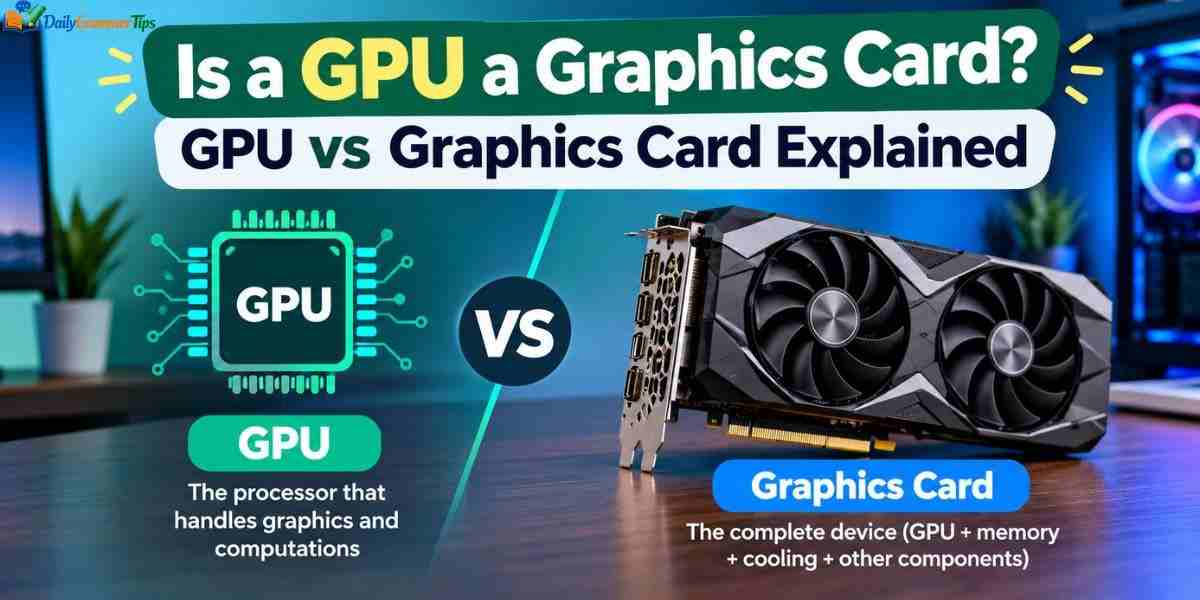
People use both terms as if they mean the same thing. They do not. A GPU is a chip. A graphics card is a full board that carries the chip.
Think of the chip as the engine and the card as the whole car. The card also holds VRAM, a cooler, power connectors, and display ports.
| Feature | GPU chip | Graphics card |
| What it is | A processor | A complete add in board |
| Includes | Cores and control logic | Chip, VRAM, cooler, ports, circuit board |
| Made by | NVIDIA, AMD, Intel | Partners such as ASUS, MSI, Gigabyte, Zotac |
| Where you find it | On a card or inside a CPU | In a PCIe slot on the motherboard |
So the answer is partly yes. The chip is the core of the card. But laptops and phones have the chip without any card.
NVIDIA, AMD, and Intel design the chips. Partners like ASUS, MSI, Gigabyte, and Zotac build the cards. They add their own coolers and factory overclocks.
This is why two cards with the same GPU can differ. One may run cooler or quieter. Another may cost more for a faster factory clock. In Pakistan, this also affects the price by thousands of rupees. Always compare the full card, not just the chip name.
Types of GPUs: Integrated, Discrete, and Virtual (Cloud)
Graphics processors come in three main types. They are integrated, discrete, and virtual. Each one suits a different need.
A student who only browses and writes needs no extra card. A gamer or editor will need a discrete card. A team training AI may rent cloud power.
Integrated and Discrete
An integrated GPU shares a chip with the CPU. It uses system RAM. It saves power, cost, and space. Most office PCs and thin laptops use it. It handles video, browsing, and light games.
A discrete GPU is a separate board. It has its own VRAM and cooling. It is far stronger and suits gaming, editing, and AI work.
The trade off is power use and heat. A discrete card needs good airflow and a proper power supply. It also costs more. Modern integrated chips have improved a lot, and some can run older esports titles at low settings.
Virtual and Cloud Options
A virtual GPU is a software slice of a real one. Cloud providers share one big card across many users. You reach it through the internet.
A cloud service lets you rent power by the hour. This suits AI training and short projects. It can help students and freelancers who cannot afford a big card. Long term use can cost more than owning a card, so compare rental cost with purchase cost. Remember that cloud rental is usually charged in dollars, which matters when the rupee is weak.
A Brief History of the GPU
The story of the GPU starts in the 1990s. Early PCs used simple graphics controllers. They relied on the CPU for most of the work.
In 1999, NVIDIA released the GeForce 256. It was marketed as the first graphics processing unit. It moved lighting and transform work off the CPU.
Through the 2000s, chips became programmable. Artists could write small programs called shaders. This gave games richer light, shadow, and water effects.
In 2007, NVIDIA launched CUDA. It let developers use the chip for general math. Scientists soon used it for data and simulation work.
In 2012, a neural network called AlexNet won a big image contest. It was trained on two NVIDIA cards. This helped start the deep learning boom.
In 2018, NVIDIA added RT cores and tensor cores to its RTX cards. Ray tracing and AI upscaling reached gamers. Since then, AMD and Intel have pushed hard too. Intel entered with its Arc cards. AMD moved forward with its RDNA design. In 2025, NVIDIA’s RTX 50 series brought GDDR7 memory and newer AI features. Each generation brings a large jump in speed, and the pace has not slowed.
What Is a GPU Used For?
A GPU is used anywhere heavy parallel math is needed. Gaming and AI have their own sections below. Here are the other big uses.
Creative and Professional Work
Video editors use the chip to render clips faster. Apps like Premiere Pro and DaVinci Resolve rely on it. 3D artists use it in Blender and Maya. Architects and engineers use it for CAD models and walkthroughs.
This matters a lot for Pakistani freelancers. Many young people earn on Fiverr and Upwork through video editing, animation, and design. A better card means faster renders and more orders finished each week. For them, a GPU can pay for itself.
Streamers also gain from it. Modern cards have hardware encoders. They record and stream video without slowing the game.
Science and Research
Scientists use the GPU for weather models and drug research. Physics simulations and medical imaging also run on it. It cuts run times from days to hours.
Students in computer science and engineering use affordable cards to learn 3D graphics, robotics, and machine learning. Cloud gaming and virtual reality also depend on it. Even self driving car research relies on it.
Crypto mining once drove huge demand. Many networks have since moved on, and special ASIC machines took over. Still, some used cards in the market were once used for mining, so buyers must be careful.
Learn more……….GPT-4o: Features, Pricing, API, Access and Retirement Status
GPU for Gaming: What Matters Most?
For gaming, the GPU is the single most important part. It decides your frame rate, resolution, and visual quality. A strong CPU helps, but the card does most of the work.
Here are the key factors to check.
Resolution. 1080p needs the least power. 1440p needs more. 4K needs the most.
Frame rate. Higher frame rates feel smoother. Many players aim for 60 fps. Competitive players in games like Valorant, CS2, and PUBG want 144 fps or more.
VRAM. Modern games use large textures. 8 GB is the minimum for 1080p today. 12 to 16 GB is safer for 1440p and 4K.
Upscaling. DLSS from NVIDIA, FSR from AMD, and XeSS from Intel boost speed. They render at a lower resolution and rebuild a sharp image using AI. Frame generation can add extra frames.
Ray tracing. It adds realistic light and reflections. It also lowers frame rate. Stronger cards handle it better.
Cooling and noise are also part of the picture. A hot card slows itself down to stay safe. Pakistani summers are harsh, so good case airflow is very important.
Also check your monitor. A strong GPU is wasted on a weak screen. A 144 Hz screen shows more frames than a 60 Hz one, but only if the card can send them fast enough.
Do not forget the power supply. Strong cards may need 650 to 850 watts or more, plus the right cables. Buy a branded power supply from a trusted maker. Power cuts and voltage swings can damage cheap units, and a good UPS or voltage protector is a wise extra for an expensive card.
GPU in AI and Machine Learning

Modern AI runs on GPUs. Chatbots, image tools, and voice assistants all need huge amounts of math. Neural networks are built from matrix operations. These match the parallel design of the chip.
Training Models
Training teaches a model by showing it huge datasets. The model adjusts millions or billions of values again and again. A cluster of cards can cut this from months to days. Memory is often the limit, so top AI cards carry far more VRAM than gaming cards.
Running Models
Running a trained model is called inference. It happens each time you ask a chatbot a question. Lighter models can run on a home GPU, and VRAM is the key limit.
A card with 16 GB or more can run many local AI tools. Free tools let you run chatbots and image makers on your own PC. They keep your data on your machine and cost nothing per use. For students and small teams in Pakistan, this can be cheaper than paying dollar subscriptions every month.
NVIDIA’s CUDA software gives it a big edge in tools and libraries. NPUs, TPUs, and FPGAs also exist, but the graphics card remains the most flexible choice for most people.
Key GPU Specs Explained: VRAM, Cores, Clock Speed, and Memory Bandwidth
A GPU spec sheet lists many numbers. A few of them matter far more than the rest. Marketing names can confuse buyers, so read the specs and real test results.
VRAM and Memory Bandwidth
VRAM is the card’s own memory. It stores textures, frames, and AI models. More VRAM helps at high resolutions and with large files.
Memory type matters too. GDDR7 is faster than GDDR6. Bus width is another number. A 256 bit bus moves more data than a 128 bit bus. Bandwidth is the total data speed, measured in GB per second.
How much VRAM do you need? For 1080p gaming, 8 GB is workable. For 1440p, aim for 12 GB or more. For 4K, creative work, and AI, 16 GB or more is a wise target.
Cores, Clock Speed, and Power
NVIDIA calls its cores CUDA cores. AMD calls them stream processors. More cores usually mean more power, but designs differ, so compare cards within the same family.
Boost clock is the peak speed. It is not the only sign of performance. Tensor cores and RT cores handle AI and ray tracing. Board power tells you the watts used, so it decides your power supply size.
Check card length and slot width too. Many strong cards are longer than 300 mm and can take up to three slots. Measure your case before you buy. Also look at the PCIe version and ports. HDMI 2.1 and DisplayPort 2.1 suit fast monitors.
GPU NVIDIA vs AMD vs Intel: Which Brand Is Right for You?
Three brands make graphics chips for PCs. They are NVIDIA, AMD, and Intel. When people search for GPU NVIDIA, they usually mean GeForce RTX cards.
| Feature | NVIDIA | AMD | Intel |
| Product line | GeForce RTX | Radeon RX | Arc |
| Recent family | RTX 50 series | RX 9000 series | Arc B series |
| Upscaling | DLSS | FSR | XeSS |
| Ray tracing | Very strong | Improving | Good for the price |
| AI and creator tools | Best support through CUDA | Growing | Growing |
| Value | Premium pricing | Strong value | Budget friendly |
| Best for | High end gaming, AI, creators | Value gaming | Entry level and mid range |
NVIDIA leads in ray tracing and AI. Its CUDA software is a standard for AI work. The cards cost more, though. They are also the easiest to find in Pakistani shops.
AMD focuses on value. Its RX 9000 cards give strong speed for the money, and the 16 GB RX 9060 XT is a popular pick locally. Intel is the newcomer. Arc cards target budget buyers, but they are harder to find in Pakistan and warranty support can be limited.
Is NVIDIA the best? It depends on your needs. For AI work and editing, NVIDIA is the safe pick. For pure gaming on a budget, AMD is hard to beat. If you use Blender, DaVinci Resolve, or local AI tools, look up which brand runs them best before you pay.
How to Choose the Right GPU for Your Needs
Choosing a GPU starts with your use and your budget. Ask three simple questions. What will you do with it? At what resolution? How much can you spend in rupees?
Set your budget first. Then pick the resolution you want. Finally, match a card to those two facts. This order stops you from overspending on power you will never use.
For Gaming
For 1080p esports, cards like the RTX 5060 or RX 9060 XT work well. For 1440p, look at the RTX 5070, RX 9070, or RTX 5070 Ti. For 4K, the RTX 5080 or higher suits best.
Try to get 12 GB of VRAM or more if your budget allows. Games use more memory every year. A card with more VRAM lasts longer. A good rule is to spend more on the card than on any other part.
For Creative Work and AI
Creators need VRAM and software support. 16 GB is a good start. NVIDIA cards work best with many editing and AI tools. For AI, VRAM sets the model size you can run.
Before you buy, run through this short checklist.
- Check that the card fits your case.
- Check your power supply wattage and cable types.
- Check that the motherboard has a PCIe x16 slot.
- Check that your monitor ports match the card.
- Read real benchmarks and reviews.
- Confirm the warranty terms and who gives the warranty.
Do not chase the newest model only. A good older card at a lower price can be the better deal. Match the card to your real needs.
GPU Price: How Much Does a GPU Cost?
GPU prices depend on the model, brand, VRAM, and stock. In Pakistan, the final price also depends on the dollar rate, import costs, and taxes. Prices range from around Rs. 18,000 for very basic cards to several hundred thousand rupees for high end models.
What Changes the Price?
- Brand and model, since custom coolers cost more.
- VRAM size and memory type.
- Demand from gamers and AI buyers.
- Stock levels and new launches.
- The dollar to rupee exchange rate.
Watch big sale seasons for good deals. Open box and refurbished cards can also save money. Just confirm the warranty first. A cheaper card is not always a bad deal. Look at speed per rupee, not just the price tag. Also count extra costs, like a stronger power supply, a larger case, or a UPS.
GPU Price in Pakistan
Graphics card prices in Pakistan depend heavily on the dollar rate. Import costs, taxes, retailer margins, and limited stock add more. Popular cards are easier to find and price more fairly. Rare or new models can cost much more.
Current Price Range in Pakistan
Here are approximate prices seen on local retailer listings in September 2026. They change often, so treat them as a guide.
| Card | VRAM | Approximate price in PKR |
| RTX 5050 | 8 GB | About Rs. 112,000 |
| RTX 5060 | 8 GB | Rs. 125,000 to 165,000 |
| RX 9060 XT | 8 GB | About Rs. 126,000 |
| RX 9060 XT | 16 GB | Rs. 165,000 to 185,000 |
| RTX 5060 Ti | 16 GB | About Rs. 195,000 to 210,000 |
| RTX 5070 | 12 GB | Rs. 250,000 to 297,000 |
| RX 9070 | 16 GB | Rs. 214,000 to 240,000 |
| RTX 5070 Ti | 16 GB | From about Rs. 385,000 to 450,000 |
| RTX 5080 | 16 GB | About Rs. 515,000 to 590,000 |
Prices differ by brand and model. A basic dual fan card costs less than a premium triple fan card. The same RTX 5060 can differ by more than Rs. 30,000 between brands and shops. Used and open box cards cost less again. Top cards like the RTX 5090 are priced very high and are often quoted on request, so ask the seller.
Where to Buy and Tips for Pakistani Buyers

Big computer markets like Hafeez Centre in Lahore, Regency Plaza and Saddar in Karachi, Saddar in Rawalpindi, and the Blue Area in Islamabad have many sellers. Online computer stores deliver across the country. Prices between plazas and online stores are often close. The bigger difference is the warranty.
- Compare several shops and online stores. Prices can differ by a large amount for the same card.
- Ask about stock before you visit, and confirm the price on the day you pay.
- Always ask for a proper invoice and a distributor warranty. A shop only warranty can be hard to claim.
- Check the box seal and the serial number.
- Test the card as soon as you get it. Run a game or a stress test for a while.
- Be careful with used cards. Some were used for mining for long hours. Ask for a test video and a short return window.
- Watch the dollar rate. When it rises, card prices tend to follow.
- Buy from shops with good reviews. A slightly higher price with a solid warranty is often the safer choice.
Finally, consider your real needs. A midrange card is enough for most players and students. Spending on flagship power only makes sense for heavy work like AI, 3D, or 4K gaming.
Frequently Asked Questions
What is a GPU for a computer?
It is the chip that draws images and handles heavy parallel math. It keeps games, video, and AI tools running smoothly.
What is a GPU vs CPU?
A CPU handles general tasks one after another. A GPU handles thousands of similar tasks at once.
What is a GPU?
It is a processor built for parallel work. It began with graphics and now also powers AI.
Is NVIDIA a GPU or CPU?
NVIDIA is a company, not a chip. It mainly designs graphics chips such as the GeForce RTX series.
Does GPU mean RAM?
No. A GPU is a processor, while RAM is memory. Graphics cards also carry their own memory called VRAM.
What is a good GPU price in Pakistan for a beginner?
For 1080p gaming and light editing, cards around Rs. 125,000 to 165,000 are a common starting point. Check the warranty before you pay.
Conclusion
A GPU is now one of the most important parts of any computer. It powers games, creative tools, and AI. Knowing how it differs from a CPU and a graphics card helps you buy wisely. It also connects gaming, design, science, and AI in one small chip.
Focus on your use, resolution, VRAM, and budget. Compare brands and check current prices in Pakistan before you buy. Ask for a valid warranty and protect your card with a good power supply. With these steps, you can pick a card that fits both your needs and your wallet.
